Mastering Git Stash: Your Secret Weapon for Clean Workflows
git version-control developer-tools
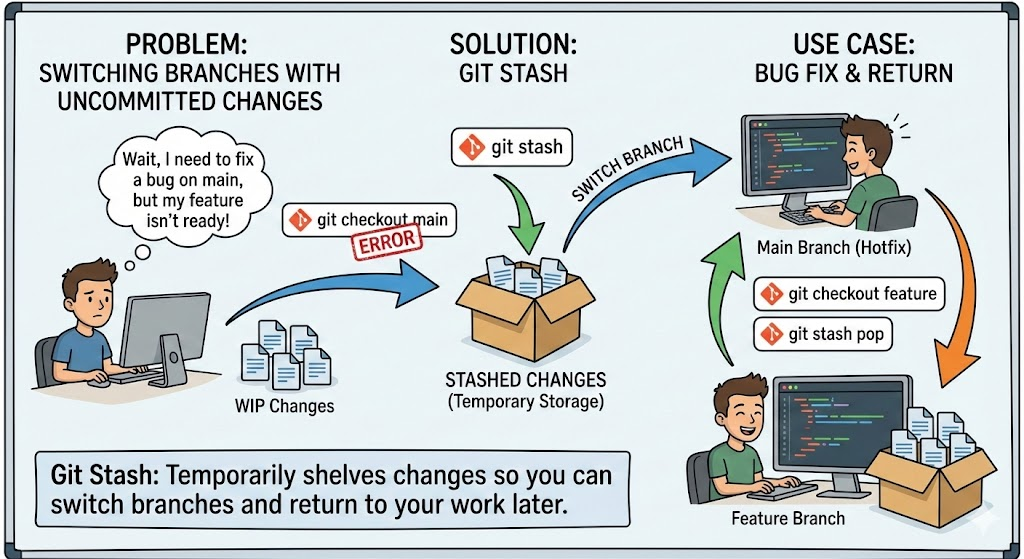
Working on a feature when an urgent bug report comes in? Git stash is your best friend. This powerful yet often underutilized Git command lets you temporarily shelve your uncommitted changes, switch contexts, and come back to your work later without losing anything.
What is Git Stash?
Git stash takes your modified tracked files and staged changes and saves them on a stack of unfinished changes that you can reapply at any time. Think of it as a temporary clipboard for your work-in-progress code.
When Should You Use Git Stash?
Here are common scenarios where git stash shines:
- Context switching: You’re working on a feature but need to quickly fix a critical bug on another branch
- Pulling changes: Your working directory has uncommitted changes and you need to pull the latest updates
- Experimentation: You want to try something without committing your current work
- Clean slate: You need a clean working directory to run tests or check something
Essential Git Stash Commands
Basic Stashing
# Save your current changes
git stash

# Save with a descriptive message
git stash push -m "Work in progress on user authentication"

# Stash including untracked files
git stash -u

# Stash everything including ignored files
git stash -a
Viewing Your Stashes
# List all stashes
git stash list

# Show the changes in the most recent stash
git stash show

# Show detailed diff of a specific stash
git stash show -p stash@{0}
Applying Stashed Changes
# Apply the most recent stash and keep it in the stash list
git stash apply

# Apply the most recent stash and remove it from the stash list
git stash pop

# Apply a specific stash
git stash apply stash@{2}

# Pop a specific stash
git stash pop stash@{1}
Managing Stashes
# Delete the most recent stash
git stash drop

# Delete a specific stash
git stash drop stash@{1}

# Delete all stashes
git stash clear

# Create a branch from a stash
git stash branch feature-branch stash@{0}
Practical Workflow Example
Let’s walk through a real-world scenario:
# You're working on a new feature
git checkout feature-user-profile
# ... making changes to profile.js and styles.css

# Urgent bug report comes in!
# Save your current work
git stash push -m "User profile feature WIP"

# Switch to main branch and create a hotfix branch
git checkout main
git checkout -b hotfix-login-bug

# Fix the bug, commit, and push
# ... fix the bug
git add .
git commit -m "Fix login validation bug"
git push origin hotfix-login-bug

# Back to your feature work
git checkout feature-user-profile
git stash pop

# Continue working on your feature
Advanced Tips
Stashing Specific Files
You can stash only specific files using the pathspec:
git stash push -m "Stash only CSS changes" styles.css
Interactive Stashing
For fine-grained control over what to stash:
git stash -p
This lets you interactively select which hunks to stash, similar to git add -p.
Creating a Branch from a Stash
If you realize your stashed work should be on a separate branch:
git stash branch new-feature-branch
This creates a new branch, checks it out, applies the stash, and drops it if successful.
Common Pitfalls to Avoid
- Forgetting about stashes: Use descriptive messages with
git stash push -mto remember what each stash contains - Stash conflicts: When popping a stash, you might get merge conflicts. Resolve them like you would any merge conflict
- Lost stashes: Dropped stashes can sometimes be recovered using
git fsck --unreachable | grep commitand thengit show <commit-hash>
Best Practices
- Use descriptive messages: Always include a message describing what’s in the stash
- Don’t use stash as long-term storage: Stashes are meant to be temporary. If you need to save work for later, create a WIP commit or a branch instead
- Review before popping: Use
git stash show -pto review what you’re about to apply - Keep your stash list clean: Regularly clear out stashes you no longer need
Conclusion
Git stash is an essential tool for maintaining a clean and flexible workflow. It allows you to switch contexts quickly without the overhead of creating commits or branches for work-in-progress code. Master these commands, and you’ll handle interruptions and context switches with confidence.
Remember: stash early, stash often, but don’t let stashes pile up. Your future self will thank you for keeping things organized!